
- What AI features does TradingView have in 2026?
- What is TradingView AI Copilot?
- Can AI Copilot write Pine Script?
- What is the TradingView MCP server?
- Are there AI tools in the screener and in company filings?
- Which TradingView plans include AI Copilot, and what does it cost?
- Is there a usage limit?
- What happened to the free browser extension?
- How does AI Copilot work on a chart, step by step?
- What can TradingView AI not do?
- How does TradingView AI compare with TrendSpider and Trade Ideas?
- What does TradingView AI look like with real numbers?
- What are the most common mistakes with TradingView AI?
- Which tools help you get the most from TradingView AI?
- Test yourself: a 5-question TradingView AI quiz
- FAQ
- Is TradingView AI Copilot free?
- Does TradingView AI work on the mobile app?
- Can TradingView AI give buy and sell signals?
- Can I connect ChatGPT or Claude to TradingView?
- How many Copilot requests do I get?
- Is AI-written Pine Script safe to use?
- The verdict
Trading involves substantial risk of loss, and most retail traders lose money. This article is education, not financial advice.
Disclosure: this article contains affiliate links. If you sign up through them, Trader Edge Hub may earn a commission at no extra cost to you. We only mention tools we think fit the topic.
TradingView AI went from a browser-extension experiment to a paid, built-in assistant in 2026. If you chart on TradingView, you now face a simple question: is the tradingview ai add-on worth paying for, and what will it actually do on your charts? This review covers each AI feature, what it costs on every plan, how it works step by step, and where it falls short. We finish with a worked example on a $5,000 account and the mistakes we see most often.
Quick answer: TradingView's main AI feature is AI Copilot, a chart assistant that sets up indicators, draws levels, creates alerts and writes Pine Script. It is a separate monthly add-on (listed at $7.50 in October 2026) that needs a paid plan from Essential upwards. It does not place trades, predict prices or replace your own risk checks.
What AI features does TradingView have in 2026?
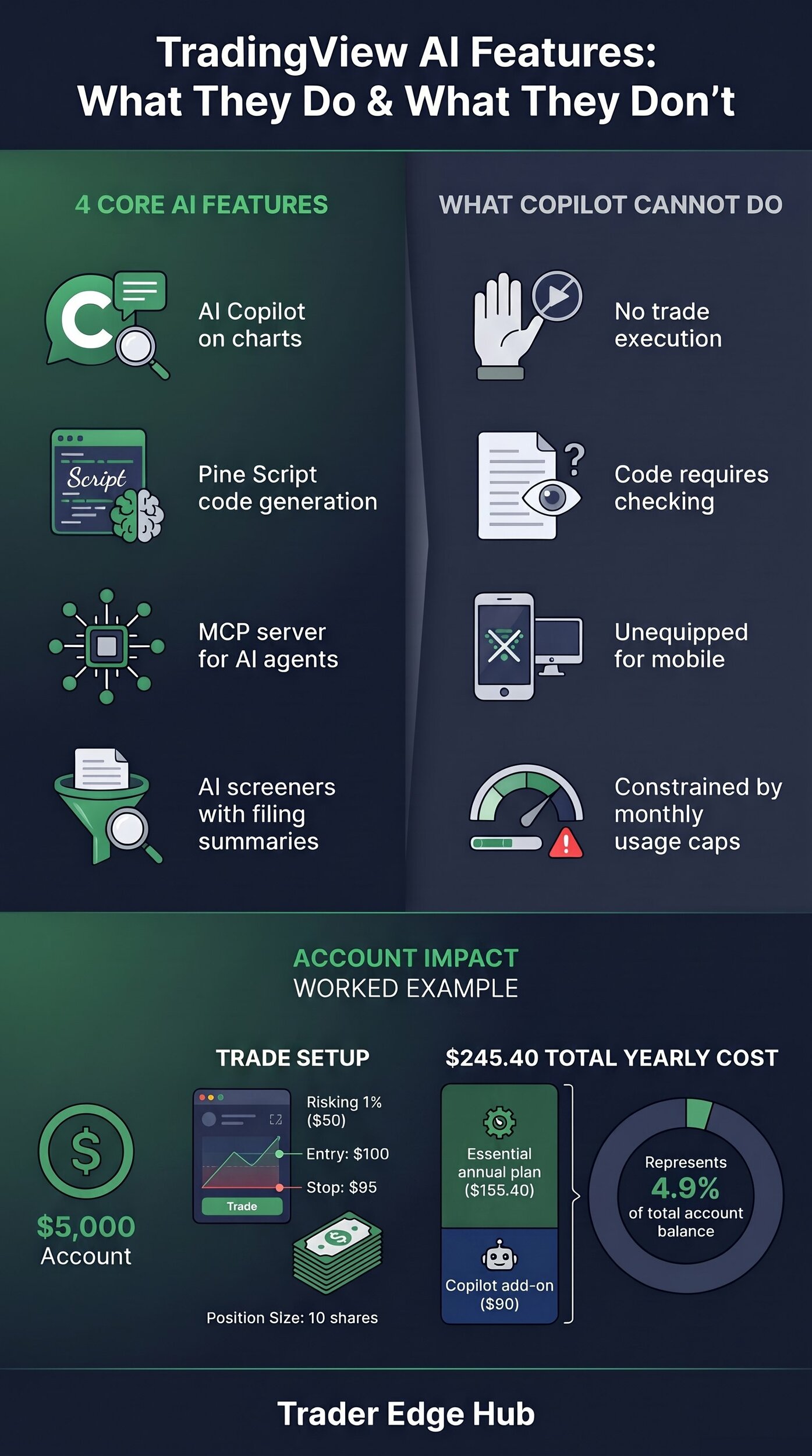
TradingView now has four groups of AI features: AI Copilot on charts, AI-written Pine Script, an MCP server for outside AI agents, and AI help in its screeners and company filings. Copilot is the one most traders will use day to day.
What is TradingView AI Copilot?
AI Copilot is an assistant that sits in the right-hand panel of Supercharts (TradingView's main chart page) and can see the chart you have open. TradingView announced it on its blog on 28 September 2026 and followed with a press release on 20 October 2026. It uses TradingView's own data: quotes, indicators, financials, news, earnings, economic calendars and screener results.
You talk to it in plain English. According to TradingView, it can change the symbol and layout, add or remove indicators, draw levels, create alerts and watchlists, and build a written trading plan. Independent reviews such as TradersPost's also show it marking support and resistance, trendlines and common chart patterns.
Can AI Copilot write Pine Script?
Yes. Copilot writes and applies Pine Script (TradingView's own scripting language for indicators and strategies) from a plain-text request. You might ask for "a histogram of the gap between the 20 and 50 EMA that turns green when it widens". It can also run and optimise a strategy, then explain the Strategy Tester report: profit factor (gross profit divided by gross loss), win rate and max drawdown (the largest peak-to-trough fall in equity).
What is the TradingView MCP server?
The MCP server lets outside AI assistants, such as Claude or ChatGPT, read your TradingView data. MCP (Model Context Protocol) is an open standard for connecting AI models to data and tools. TradingView launched it in beta on 16 September 2026, according to Finance Magnates and Crypto Briefing.
It is available on Essential and higher plans. You sign in with your TradingView account, so no API key is needed. The tools cover price history, screeners, fundamentals, news, filings, economic calendars, watchlists and alerts, with a limit of about 100 tool requests per minute per user. The documentation lists no tools for reading broker balances or placing orders.
Are there AI tools in the screener and in company filings?
Yes. The stock screener accepts plain-language requests and turns them into filters and columns. TradingView's pricing page lists an allowance of AI screener requests from 100 to 500, depending on the plan. TradersPost also reports AI summaries of US company filings (10-K annual and 10-Q quarterly reports, plus earnings call transcripts) for documents filed from June 2024 onwards, and AI-written news summaries.
Pro tip: When you ask Copilot to review a chart, ask it for the price that would prove the idea wrong. A clear invalidation level is something you can turn into a stop and a position size. A vague opinion is not.
Which TradingView plans include AI Copilot, and what does it cost?
No plan includes Copilot by default. It is an add-on on top of a paid plan: Essential, Plus, Premium or Ultimate, or a paid-plan trial. The free Basic plan cannot use it. Bullynx checked TradingView's pricing page on 15 October 2026 and found the add-on listed at 7.50 a month in US dollars, euros and pounds. TradingView's own announcement does not print a price, so confirm the total at checkout, where tax and local currency can change it.
The base plans cost the following. Annual prices come from TradingView's pricing page; monthly prices from MoneyFlock, and they match the annual savings TradingView shows.
| Plan | Monthly billing | Annual billing | Charts per tab | Indicators per chart | Price alerts |
|---|---|---|---|---|---|
| Basic | $0 | $0 | 1 | 2 | 3 |
| Essential | $14.95 | $12.95/mo ($155.40/yr) | 2 | 5 | 20 |
| Plus | $34.95 | $29.95/mo ($359.40/yr) | 4 | 10 | 100 |
| Premium | $69.95 | $59.95/mo ($719.40/yr) | 8 | 25 | 400 |
| Ultimate | $239.95 | $199.95/mo ($2,399.40/yr) | 16 | 50 | 1,000 |
So the cheapest way into Copilot is Essential plus the add-on: $12.95 + $7.50 = $20.45 a month on annual billing, or $14.95 + $7.50 = $22.45 on monthly billing. The add-on renews monthly and you can cancel it in your profile settings.
Is there a usage limit?
Yes. Each month includes a usage allowance that TradingView says most people will not reach. Unused usage does not roll over. TradingView does not publish the allowance as a number; it shows your usage as a percentage.
What happened to the free browser extension?
TradingView first released the assistant as a public-beta browser extension in April 2026. TradersPost reported a cap of 15 requests a day for that beta. The native add-on is the same assistant built into the platform, and it is now the supported route.
Common mistake: Assuming a bigger plan includes AI. Moving from Essential to Premium adds charts, indicators and alerts, but Copilot is still a separate $7.50 add-on.
How does AI Copilot work on a chart, step by step?
Setting it up takes about a minute. These steps follow TradingView's "Getting started with AI Copilot" help page:
- Open any chart on tradingview.com or in the desktop app.
- Sign in to a paid plan (Essential or higher).
- Click the AI Copilot icon in the right-hand panel.
- Click Get access and complete checkout; access starts straight after payment.
- Type a request, or pick one of the suggested prompts.
A typical first request: "Add EMA 50, EMA 200, RSI 14 and MACD to this chart." Copilot adds them for you, with no menu searching. You can then ask follow-ups, such as "Mark the last two swing lows" or "Create an alert if price closes below the 200 EMA."
What can TradingView AI not do?
The short answer: it cannot trade for you, cannot predict prices and cannot be trusted without checking. TradingView itself says Copilot can make mistakes and that its output is analysis, not financial advice.
- It does not place trades. Copilot can create alerts but does not send orders to your broker. Traders who automate use webhook alerts (automatic messages sent to another app) routed through a third-party service.
- Its Pine Script needs checking. Reviews, including TradersPost's, report generated scripts with errors or outdated functions. Read and test every script before you rely on it.
- It is not on mobile yet. TradingView says Copilot works on the web and in the desktop app only.
- It has a monthly cap. When you reach it, new requests pause until the next billing cycle.
- The MCP server is a beta. TradingView says its tools may change, and it offers no broker account or order tools.
- It does not know the future. Levels and patterns describe past price action. They are not forecasts.
How does TradingView AI compare with TrendSpider and Trade Ideas?
The three take different approaches. TradingView Copilot is a conversational helper on your own charts. TrendSpider automates chart analysis such as trendline and pattern detection. Trade Ideas, through its Holly AI engine, scans for trade ideas. The figures below come from TradersPost's April 2026 comparison; check each vendor's pricing page before you buy, because prices change.
| TradingView AI Copilot | TrendSpider | Trade Ideas (Holly AI) | |
|---|---|---|---|
| Main job | Chat assistant on your charts | Automated technical analysis | Scans and ranks US stock ideas |
| Price (per TradersPost) | $7.50 add-on + paid plan from $12.95/mo | About $52/mo annual, $82/mo monthly | About $178/mo annual for the Holly tier |
| Markets | Stocks, forex, crypto, futures and more | Stocks, ETFs, forex, futures, crypto | US stocks only |
| Best for | Faster chart set-up and Pine Script drafts | No-code strategy testing | Active US stock day traders |
For most retail traders already on TradingView, Copilot is by far the cheapest of the three. It is also the most hands-on: it saves clicks, but the analysis and the decisions stay with you.
What does TradingView AI look like with real numbers?
Here is an illustrative example with a $5,000 account and the 1% risk rule, so a $50 maximum loss per trade. The stock and prices are made up; the arithmetic is exact.
Step 1: build the chart with Copilot. On a daily chart of a $100 stock, you ask Copilot to add the 50 and 200 EMAs and RSI 14 and to mark recent support. It marks support near $95. You check that level yourself against the swing lows before using it.
Step 2: size the position yourself.
| Step | Value |
|---|---|
| Account | $5,000 |
| Risk per trade (1%) | $50 |
| Entry | $100.00 |
| Stop, below support | $95.00 |
| Risk per share | $100 − $95 = $5.00 |
| Position size | $50 ÷ $5 = 10 shares |
| Capital used | 10 × $100 = $1,000 (20% of the account) |
| Loss if stopped out | 10 × $5 = $50 |
Step 3: count the tool cost. Software is a fixed cost that your trading has to cover before you make anything.
| Cost item | Per year | Share of $5,000 |
|---|---|---|
| Essential plan, annual billing ($12.95 × 12) | $155.40 | 3.1% |
| AI Copilot add-on ($7.50 × 12) | $90.00 | 1.8% |
| Total, annual billing | $245.40 | 4.9% |
| Total, Essential on monthly billing ($14.95 × 12 + $90) | $269.40 | 5.4% |
At $50 risk per trade, $245.40 equals about 4.9R (R is your risk on one trade). Your trades need to net roughly five full winning units a year just to pay for the tools. Our guide to trading expectancy shows how to check whether your edge can carry that cost. On a $50,000 account, the same $245.40 is about 0.5%, which is why AI add-ons make more sense as accounts grow.
What are the most common mistakes with TradingView AI?
- Expecting it to trade. Copilot creates alerts and plans; it sends no orders.
- Running AI Pine Script unchecked. Read the code, compile it and test it on historical data before you trust it.
- Treating marked levels as signals. A level drawn by AI is a starting point. Confirm it against the chart and your own rules.
- Letting the AI size the trade. Do the 1% maths yourself, every time, as in the table above.
- Taking filing summaries as the full story. A summary can leave out risk factors. Read the original filing for anything that matters.
- Upgrading the base plan to get AI. Copilot is a separate add-on on every paid plan.
Pro tip: Log every trade where Copilot shaped the set-up with a tag such as "AI-assisted" in your trading journal. After 30 trades you can compare results with and without it, instead of guessing.
Which tools help you get the most from TradingView AI?
- TradingView is where all of this happens. Start on the free Basic plan to learn the charts, then move to Essential and add Copilot only if you will use it every week.
- Kavout covers a different job: AI stock research. Its Kai Score rates stocks from 1 to 9 using fundamental, technical and other data, according to WallStreetZen's review. Treat the score as a research filter, not a buy list.
- A trading journal shows whether AI is helping. Our comparison of trading journal apps covers TradeZella, Edgewonk, TraderSync and others.
Common mistake: Paying for several AI tools at once on a small account. Add one, measure it for a month, and keep it only if it saves time or improves your process.
Test yourself: a 5-question TradingView AI quiz
Check what stuck before you open a chart. The answers are below each question.
1. What do you need to use TradingView's native AI Copilot?
A) It is free on every plan, including Basic
B) A paid plan (Essential or higher) plus the AI Copilot add-on
C) The Ultimate plan only
D) A separate app with no TradingView account
Answer: B. Copilot is sold as a monthly add-on on top of any paid plan; the free Basic plan cannot use it.
2. Which of these can AI Copilot NOT do?
A) Add indicators to a chart
B) Create price alerts
C) Place a live order with your broker from the chat
D) Write a Pine Script indicator
Answer: C. Copilot is an analysis and chart assistant; it does not send orders to your broker.
3. What rate limit applies to TradingView's MCP server beta?
A) 15 requests per day
B) 50 requests per hour
C) About 100 tool requests per minute per user
D) No limit
Answer: C. Finance Magnates reports a limit of about 100 tool requests per minute per user.
4. How does Copilot help with strategy backtests?
A) It promises profitable results
B) It explains the Strategy Tester report, such as profit factor, win rate and max drawdown
C) It deposits profits into your account
D) It converts Pine Script to Python
Answer: B. Copilot can run a strategy and explain its key statistics in plain language.
5. If you want TradingView alerts to trigger trades, what do traders use?
A) A Copilot chat command
B) Webhook alerts routed through a third-party automation service
C) Push notifications on the free plan
D) Chart screenshots
Answer: B. Automation runs through webhook alerts sent to an outside service connected to your broker.
FAQ
Is TradingView AI Copilot free?
No. It is a paid monthly add-on, listed at $7.50 in October 2026, and it needs a paid plan from Essential upwards. A paid-plan trial also qualifies.
Does TradingView AI work on the mobile app?
Not yet. TradingView says Copilot works on the website and in the desktop app only.
Can TradingView AI give buy and sell signals?
It can analyse a chart and help you write a trading plan, but its output is analysis, not advice. We do not recommend treating anything it says as a signal.
Can I connect ChatGPT or Claude to TradingView?
Yes, through the MCP server beta on Essential and higher plans. It can read data and manage watchlists and alerts, but it has no tools for broker balances or orders.
How many Copilot requests do I get?
Each month includes a usage allowance shown as a percentage. TradingView does not publish the number, and unused usage does not roll over.
Is AI-written Pine Script safe to use?
Use it as a first draft. Read the code, fix errors, and test it on historical data before you rely on it.
The verdict
TradingView AI Copilot is a useful time-saver for traders who already live on TradingView: it sets up charts, drafts Pine Script and explains backtests in plain English. It is not a trading bot, its code needs checking, and on a $5,000 account the plan plus add-on costs about 4.9% a year. Your next step: open TradingView, write down three chart tasks you repeat every week, and add Copilot for one month only if it would handle all three. Then compare your journal before and after. If you also use VWAP, our VWAP and anchored VWAP guide shows the set-ups worth asking Copilot to mark.
Sources: TradingView Blog (AI Copilot announcement, 28 Sep 2026), TradingView press release via FXStreet (20 Oct 2026), TradingView Help Center (Getting started with AI Copilot), TradingView pricing page, Finance Magnates and Crypto Briefing (MCP server, 16 Sep 2026), Bullynx, TradersPost, MoneyFlock, WallStreetZen and other sources in our Trading Platforms & Tools research notebook. Prices checked October 2026 and may change.
Trading involves substantial risk of loss, and most retail traders lose money. This article is education, not financial advice.