
- What a trading journal app should do
- The five apps at a glance
- TradeZella
- Edgewonk
- TraderSync
- Tradervue
- TradesViz
- The free option: a spreadsheet
- What each plan costs per year
- How to choose
- A simple way to test before you buy
- FAQ
- Do I need a paid trading journal app?
- Which journal app is cheapest?
- Can I move my trades from one journal to another?
- Do these apps place trades or give signals?
- How long should I try a journal before judging it?
- The verdict
Trading involves substantial risk of loss. This article is education, not financial advice.
Disclosure: this article contains affiliate links. If you sign up through them, Trader Edge Hub may earn a commission at no extra cost to you. We only mention tools we think fit the topic.
A trading journal only helps if you actually use it, and the best app is the one that makes logging a trade take seconds, not minutes. The market has plenty of choices, from a free spreadsheet to tools that replay each trade tick by tick. This guide compares five popular journal apps (TradeZella, Edgewonk, TraderSync, Tradervue and TradesViz) plus the spreadsheet option, using the pricing and features listed in recent third-party reviews and, where noted, the vendors themselves. Prices change often, so confirm them on each website before you buy.
Quick answer: If you want the lowest cost and lots of statistics, look at TradesViz. If your main problem is discipline and psychology, look at Edgewonk. If you want trade replay and a modern interface, look at TradeZella. If you want broad broker coverage and AI feedback, look at TraderSync. Tradervue is a long-running option with a free tier but monthly billing only. If you are not sure yet, start free with a spreadsheet or a free plan and upgrade once logging has become a habit.
What a trading journal app should do
A journal app is more than a diary. It imports your trades from your broker, calculates your statistics and lets you add context such as the setup, your emotional state and a screenshot. Our guide to the 8 things to track in a trading journal lists the data points worth capturing. When you compare apps, check them against five questions:
- Import: Does it connect to your broker, accept a file upload (CSV), or need manual entry?
- Statistics: Does it show win rate, average win and loss, expectancy, drawdown and R-multiples (profit or loss measured in units of your initial risk)?
- Context: Can you tag setups, mistakes and emotions, and attach screenshots?
- Review tools: Does it offer replay, charts or reports that make your weekly review faster?
- Price and billing: What does the plan you need cost per year, and can you pay monthly?
The five apps at a glance
The table below uses prices from a third-party review last updated in October 2026, cross-checked with vendor pages where we could. Treat it as a starting point, not a quote.
| App | Listed pricing | Free option | Import |
|---|---|---|---|
| TradeZella | Basic $29/month or $288/year. Premium $49/month or $399/year | No | Auto-sync with several brokers and platforms, plus about 25 more via file upload |
| Edgewonk | $197/year, one plan with all features | No | MetaTrader auto-sync, many platforms by file import |
| TraderSync | Pro $29.95/month. Premium $49.95/month. Elite $79.95/month | No | 700+ broker integrations listed |
| Tradervue | Silver $29.95/month. Gold $49.95/month. No annual plans | Limited free plan (30 trade imports a month) | CSV import from 80+ platforms |
| TradesViz | Pro $19.99/month or $179.88/year. Platinum $29.99/month or $268.88/year | Yes (3,000 executions a month) | 200+ brokers for import, 40+ with auto-sync |
Broker counts differ between sources, because vendors count integrations differently and add new ones often. Check that your own broker or platform is on the list before you pay.
TradeZella
TradeZella is built around review. Its standout feature is trade replay, which lets you step through a trade candle by candle (the Premium plan adds this) so you can see what you saw at the time. It also has a built-in notebook and a calendar view of daily profit and loss. It syncs with a number of brokers and platforms, including Interactive Brokers, Schwab, thinkorswim, TradeStation and Tradovate.
Good for: traders who learn visually and want replay. Watch out for: it was the most expensive tool in the review we used, and the cheaper Basic plan covers one account and has no replay. We will cover it in depth in a separate review.
Edgewonk
Edgewonk focuses on behavior. It has a Tiltmeter that charts your discipline as streaks of strong and weak behavior, mental tags to record states such as confidence or stress, and a weekly scan that estimates how much profit you lost to broken rules. It handles stocks, futures, forex, crypto and options, and imports files from many platforms. There is one plan with every feature, billed annually at about $197 in the sources we checked, and no monthly option or free tier.
Good for: traders whose problem is execution and discipline rather than strategy. If you recognize the patterns in our guide to overtrading, this is the style of tool that measures them. Watch out for: it is a journal, not a charting platform, so you will still need your own charts. It has no dedicated mobile app, and its behavioral reports only work if you fill in the psychology fields after each session.
TraderSync
TraderSync lists the widest broker coverage of the group, with 700+ integrations, plus 100+ statistics, iOS and Android apps, a TradingView integration and an AI coaching assistant. Higher tiers add more, including market replay on the top plan.
Good for: traders who use a less common broker or want a mobile app. Watch out for: the tier structure can be confusing, the top tier is the priciest in this comparison at $79.95 a month, and the lower tiers limit the AI messages you can send per day.
Tradervue
Tradervue has been around a long time. It offers charting, performance analytics and exit analysis, and it supports stocks, options, futures and forex through file import. There is a limited free plan, with a cap of 30 trade imports a month in the review we used, and paid plans at $29.95 and $49.95 a month.
Good for: low-volume traders who want to try a journal at no cost. Watch out for: monthly billing only, which makes it the priciest entry plan per year here, no crypto support in that review, and a thinner set of chart types than newer rivals according to TradesViz, which is a competitor. Always confirm the free-plan limits on the site before relying on them.
TradesViz
TradesViz is the budget pick with the most statistics. The vendor claims 600+ statistics and charts, supports stocks, options, futures, forex and crypto, and has a free plan with 3,000 executions a month. The Pro plan is $19.99 a month, or $179.88 a year in the review.
Good for: data-minded traders who want depth at a low price. Watch out for: reviewers describe the interface as dated and busy for beginners, and it runs in the browser without a native mobile app. TradingView integration needs the Platinum plan in that review.
The free option: a spreadsheet
Excel or Google Sheets costs nothing, and for the first 50 to 100 trades it is often enough. You log the date, market, setup, entry, stop, exit, result in R and a one-line note. The drawbacks are manual entry, formula mistakes that can corrupt your numbers and a growing time cost if you trade often. Many traders start here and move to an app once they have proven to themselves that they will keep logging.
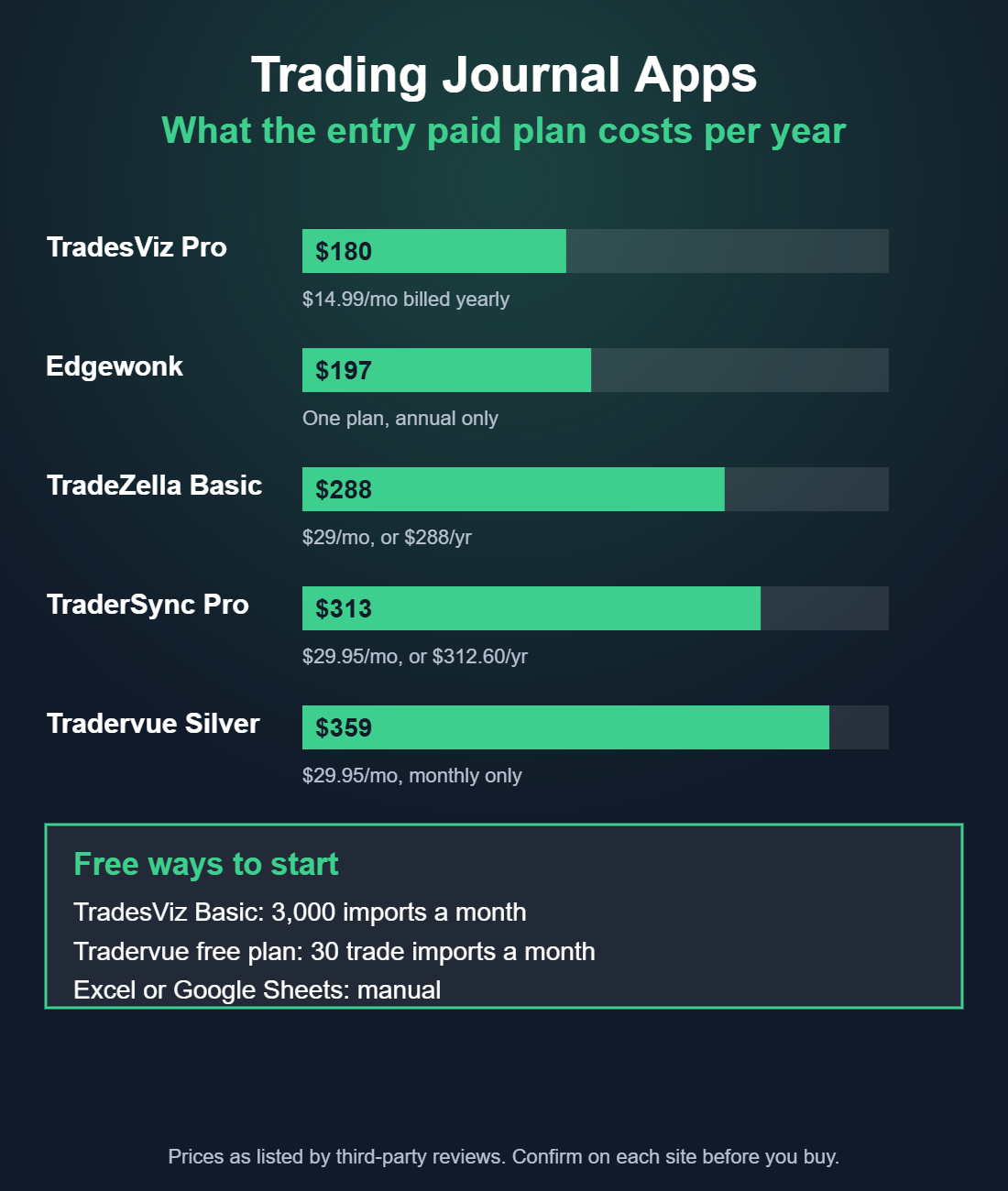
What each plan costs per year
Paying monthly for twelve months versus paying yearly, using the listed prices:
| Plan | 12 months, paid monthly | Paid yearly |
|---|---|---|
| TradesViz Pro | $239.88 | $179.88 |
| Edgewonk | Not offered | $197.00 |
| TradeZella Basic | $348.00 | $288.00 |
| TraderSync Pro | $359.40 | $312.60 |
| Tradervue Silver | $359.40 | Not offered |
| TradeZella Premium | $588.00 | $399.00 |
| TraderSync Premium | $599.40 | $521.40 |
| Tradervue Gold | $599.40 | Not offered |
Annual billing saves money where it exists, but you commit for a year. Look for a refund window before you pay, as Edgewonk lists a 14-day full refund in the source we read. Verify that on its site.
How to choose
| If you... | Consider |
|---|---|
| Are just starting and want to build the habit | A spreadsheet or a free plan (TradesViz Basic, Tradervue free) |
| Want the most statistics for the least money | TradesViz Pro |
| Keep breaking your own rules or trading on tilt | Edgewonk |
| Learn best by replaying trades | TradeZella Premium (replay is not on Basic) |
| Trade with a less common broker or want a mobile app | TraderSync, after checking your broker is supported |
| Trade a few times a week and want something simple and free | Tradervue free plan, within its import cap |
A simple way to test before you buy
- Export 30 days of trades from your broker as a CSV file.
- Import them into a free plan or trial of two apps. If the import is messy, that is a sign of the daily friction you will face.
- Tag every trade with the setup and whether you followed your plan.
- Run one weekly review in each. Notice which one shows you something you did not already know.
- Pick one and commit for 90 days. A journal pays off over months, not days.
Common mistake: Paying for the most advanced tool before you have the habit. Fancy analytics are useless if you only log trades once a month. Consistency beats features.
Pro tip: Whatever you pick, keep a copy of your raw broker exports. If you switch apps, several of them can import another tool's files, and your history stays yours.
A journal also supports your risk rules. Once your trades are logged, you can check your average loss against your plan, see how often you break your daily loss limit and review losing streaks with real data.
FAQ
Do I need a paid trading journal app?
No. A spreadsheet is enough to start. A paid app earns its price when you trade often enough that manual entry becomes a chore, or when you want replay, behavioral reports and richer statistics.
Which journal app is cheapest?
Among the apps compared here, TradesViz has the lowest listed entry price for paid plans, and it has a free tier. Edgewonk is the next cheapest per year at about $197. Prices change, so verify them.
Can I move my trades from one journal to another?
Often, yes. Most apps import CSV files, and Edgewonk lists support for importing exports from TraderSync, Tradervue and TradeZella. Keep your raw broker files as a backup either way.
Do these apps place trades or give signals?
No. They are analysis tools. They do not execute orders and they do not tell you what to trade.
How long should I try a journal before judging it?
Give it at least 30 trades and several weekly reviews. One week of data rarely shows a pattern.
The verdict
There is no single best journal app, only the best fit for your problem and budget. Start free, log every trade for a month and see which questions you keep asking. Then choose the tool that answers them fastest. A cheap tool you use every day beats an expensive one you open once a week.
Trading involves substantial risk of loss. This article is education, not financial advice.