

- What is volume profile and how is it different from regular volume bars?
- How is a volume profile built (rows, ticks per row, up and down volume)?
- What is the point of control (POC)?
- What is the value area, VAH and VAL, and why 70%?
- What are high-volume and low-volume nodes (HVN and LVN)?
- Which volume profile types does TradingView offer (Visible Range, Session, Fixed Range, Anchored) and when do you use each?
- What do volume profile shapes (D, P, b, double distribution) tell you?
- How do traders use volume profile in practice?
- How does a volume profile trade look with real numbers?
- What are the 6 common volume profile mistakes?
- Which tools help you analyze volume profile?
- Test yourself: 5-question volume profile quiz
- Frequently asked questions about volume profile
- Can you use volume profile for swing trading?
- What is the difference between volume profile and market profile?
- Is volume profile available on the free TradingView plan?
- Why is 70% used for the value area calculation?
- What is a naked or virgin POC?
- How does volume profile differ from standard VWAP?
- What is the verdict on volume profile trading?
Trading involves substantial risk of loss, and most retail traders lose money. This article is education, not financial advice.
Disclosure: this article contains affiliate links. If you sign up through them, Trader Edge Hub may earn a commission at no extra cost to you. We only mention tools we think fit the topic.
Most retail traders struggle because standard charts only show price changes over time. Conventional volume bars show when trading expanded, but conceal where big participants transacted. Learn how volume profile structure reveals price levels where volume accumulated. In this guide, we at Trader Edge Hub explain how volume profile helps you locate fair value and identify key support zones.
Quick answer: Volume profile displays total traded volume horizontally across specific price levels. It identifies the Point of Control [POC, highest volume price level] and Value Area [VA, price range containing roughly 70% of total volume]. Traders use these volume-weighted reference zones to identify fair value and key support or resistance.
What is volume profile and how is it different from regular volume bars?
Volume profile reorganizes volume along the vertical price axis. It shows where trading occurred rather than when it happened. Traditional volume bars stand vertically beneath price candles along the horizontal time axis. Each traditional bar records total transactions within a specific time interval, such as 1 minute or 1 day.
According to TradingView's basic concepts guide, standard volume answers when market activity expanded or contracted. Volume profile turns that transaction data sideways into a horizontal histogram from the price axis. This view displays total executed contracts at each price level across your selected period.
As documented by Forex Tester Online, standard volume bars show when activity happened. Volume profile shows where large market participants traded. Heavy trading creates key support and resistance zones. Learn more in our VWAP and Anchored VWAP guide on combining volume benchmarks with price action.
Per TradingInDepth's guide, volume profile is descriptive rather than predictive. It records past executed transactions instead of forecasting future price movement. Good Crypto notes that Peter Steidlmayer developed Market Profile in 1980 at the Chicago Board of Trade [CBOT, a futures exchange]. He measured time at price, which later evolved into modern volume profile measuring volume at price.
How is a volume profile built (rows, ticks per row, up and down volume)?
A volume profile is built by dividing a chart's price range into horizontal rows. The calculation assigns executed volume to each price bin. The platform calculates total transactions executed within each price row across the selected timeframe. The resulting histogram displays longer bars at high-volume prices and shorter bars at low-volume prices.
According to TradingView's calculation documentation, the indicator analyzes lower-timeframe data to assign volume accurately across price rows. For a 1-day profile, TradingView loads 1-minute bars to analyze price levels and bar directions. If a lower-timeframe bar closes above or equal to its open, its volume counts as up volume [buying activity]. If it closes below its open, its volume counts as down volume [selling activity].
Traders configure histogram resolution using Rows Layout and Row Size settings on TradingView. When set to Number of Rows, the indicator calculates ticks per row [tick size, the minimum price movement for an asset]. The formula equals histogram price span divided by row count divided by tick size.
According to TradingView's documentation, calculating profiles on non-standard charts distorts volume data. Renko or Heikin Ashi brick prices do not represent actual executed trades. On Renko charts, daily candle volume is divided equally across artificial bricks, creating inaccurate profile rows. Always build volume profiles on standard candlestick or bar charts to ensure data integrity.
Pro tip: Increase your TradingView row size setting to 100 or 1,000 rows when using Fixed Range Volume Profile. Trader-Dale.com and TradingView guide videos note that higher row counts reveal precise High Volume Nodes that lower default settings obscure.
What is the point of control (POC)?
The Point of Control [POC, highest volume price level in a selected period] is the single price row with the thickest histogram bar. It represents the price where buyers and sellers transacted the greatest number of contracts or shares. On TradingView charts, the indicator highlights this benchmark with a prominent horizontal red line.
According to Optimus Futures, the POC acts as a fair value magnet. It represents the exact price where buyers and sellers agreed most. When price wanders away from fair value during quiet sessions, it frequently pulls back toward the POC. Traders evaluate whether market participants defend or reject this high-volume price on retests.
In a backtest study of 2,847 trade setups, TradingInDepth observed that price reacted at the POC line on 68.3% of retests in their sample. Trader Dale emphasizes treating the POC as a price zone rather than an exact line because real market trading is choppy.
As documented by Trader-Dale.com, an untested POC from a prior trading session is called a virgin or naked POC. Naked POCs represent unvisited fair value levels that often act as targets when price returns to previous session ranges.
What is the value area, VAH and VAL, and why 70%?
The Value Area [VA, the price range containing a designated percentage, usually 70%, of total traded volume] defines where the market perceived fair value. The Value Area High [VAH, upper price boundary of the value area] marks the top edge of this fair value range. The Value Area Low [VAL, lower price boundary of the value area] marks the bottom edge.
According to Good Crypto, the 70% convention originates from statistics and normal distribution models. In a normal bell curve, 68.2% of data falls within one standard deviation of the mean. Financial platforms rounded 68.2% to 70% to create a clean fair value boundary.
TradingView documentation notes that the value area algorithm starts at the POC. It iteratively adds adjacent higher-volume rows until capturing 70% of volume. Per NinjaTrader's documentation, NinjaTrader defaults to 68% for its value area calculation, while Thinkorswim and TradingView default to 70%. Verify your platform's default settings before comparing levels with other traders.
Common mistake: Avoid trading levels from Visible Range Volume Profile without locking your chart view. Mind Math Money notes that scrolling or zooming recalculates VRVP levels dynamically, creating inconsistent price references.
What are high-volume and low-volume nodes (HVN and LVN)?
High Volume Nodes [HVNs, price zones with above-average trading volume] are thick profile bulges where heavy trading occurred. Low Volume Nodes [LVNs, price zones with below-average trading volume] are thin valleys with minimal trading. These structural peaks and valleys show where the market accepted or rejected specific prices. Understanding node structure helps you anticipate how fast price will travel across chart zones.
According to TradingInDepth, LVNs act as acceleration zones where price travels rapidly between HVN balance areas. You can use LVNs as breakout paths or target zones when trading momentum moves.
Which volume profile types does TradingView offer (Visible Range, Session, Fixed Range, Anchored) and when do you use each?
| Profile Tool Name | How It Calculates | Best Use Case | Key Advantage & Limitation |
|---|---|---|---|
| Visible Range [VRVP] | Calculates volume for all price bars visible on active screen viewport. | Quick market structure overviews and multi-timeframe scans. | Dynamic and fast, but levels change whenever you zoom or scroll. |
| Session Volume [SVP] | Builds individual volume histograms for each trading session automatically. | Intraday day trading, scalping, and tracking daily fair value shifts. | Resets daily for clear session levels, but less useful for swing trades. |
| Fixed Range [FRVP] | Calculates volume data between two manually selected chart points. | Analyzing specific swing legs, consolidations, or news breakout ranges. | Stays locked to selected price moves, but requires manual placement. |
| Anchored Volume [AVP] | Calculates volume from a chosen anchor bar through current developing bar. | Tracking ongoing trend moves, earnings gaps, or major market shifts. | Updates continuously from anchor event, but depends on proper anchor choice. |
What do volume profile shapes (D, P, b, double distribution) tell you?
A D-shaped profile indicates a balanced market where price rotated within fair value. According to Quantower, the thickest part of the D-shape sits near the center. Buyers and sellers agreed on fair value, creating a ranging environment.
A P-shaped profile signals aggressive buying or short-covering that drove prices higher. As documented by Trader-Dale.com, volume concentrates near the top of the range. Sellers failed to defend higher prices, leaving a thin low-volume tail below.
A b-shaped profile indicates aggressive selling or long liquidation that pushed prices lower. According to TradingInDepth, volume concentrates near the bottom. Buyers failed to absorb supply, leaving a thin low-volume tail above.
A double distribution profile features two high-volume bulges separated by a thin low-volume area. Per Good Crypto, this shape forms when price shifts between balance zones. The low-volume gap marks a rapid transition zone.
How do traders use volume profile in practice?
Traders study three primary volume profile setups to evaluate market structure. These setups include value area rejection, value area breakouts, and low-volume node transitions. We describe these historical patterns for educational analysis rather than trade signals.
A value area rejection occurs when price tests a value area edge and gets turned back. When price holds inside the value area, it often rotates back toward the Point of Control [POC, highest volume price level]. Review our guide on 10 Day Trading Tips for Beginners for execution discipline.
A value area breakout occurs when price moves beyond Value Area High [VAH, upper value area boundary] or Value Area Low [VAL, lower boundary]. Heavy volume accompanies the move beyond fair value. Price consolidation outside the boundary signals acceptance of new levels.
Low Volume Nodes [LVNs, price zones with below-average volume] act as fast-movement zones on charts. Minimal trading occurred at these levels, offering little resistance. When price enters an LVN, it tends to move quickly toward the next High Volume Node [HVN, price zone with above-average volume].
Pro tip: Combine volume profile levels with volume-weighted price lines to confirm support zones. When a major POC aligns with a rising session line, the zone carries more weight. Read our detailed How to Use VWAP and Anchored VWAP guide for setup rules.
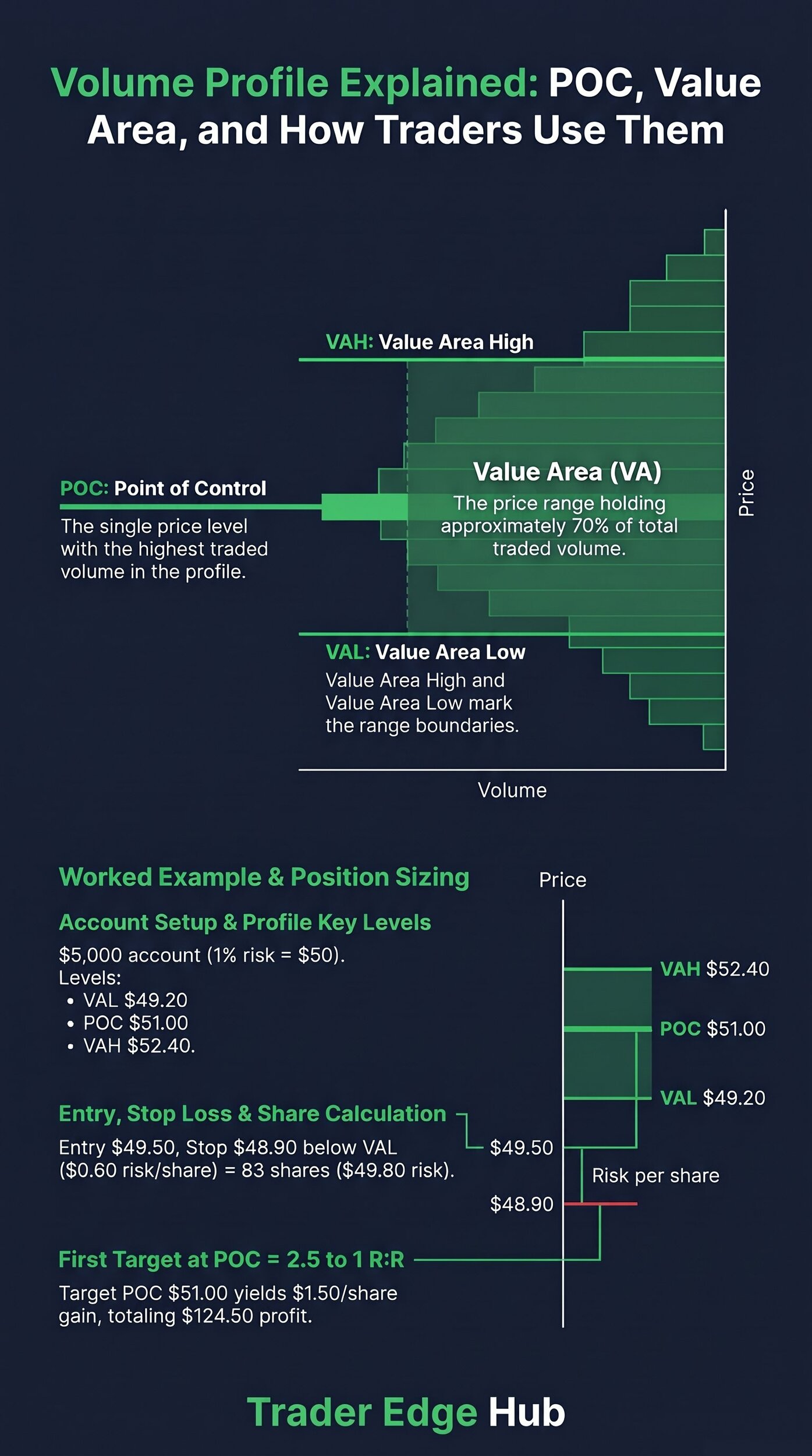
How does a volume profile trade look with real numbers?
Calculating risk per share and position size before entering a trade keeps each loss small and known. We at Trader Edge Hub suggest risking no more than 1% of total account equity per trade. Read our guide on Position Sizing: The 1% Rule Explained for complete risk formulas.
Consider a hypothetical trade in a $5,000 account using a strict 1% risk limit ($50 maximum risk). You observe price returning inside a daily value area after testing lower prices. You enter a long trade at $49.50 as buyers defend Value Area Low [VAL, lower value area boundary].
| Trade Metric Parameter | Worked Calculation Value | Structural Explanation |
|---|---|---|
| Account Capital | $5,000.00 | Total starting trading account equity balance. |
| Maximum Account Risk (1%) | $50.00 | 1% of $5,000 account balance limit per trade. |
| Value Area Low [VAL] | $49.20 | Bottom boundary of the identified 70% value area. |
| Point of Control [POC] | $51.00 | High-volume target price where most volume traded. |
| Value Area High [VAH] | $52.40 | Top boundary of the identified 70% value area. |
| Entry Price | $49.50 | Executed long entry after price re-enters value area. |
| Stop Loss Price | $48.90 | Placed $0.30 below VAL to avoid market noise. |
| Risk Per Share | $0.60 | $49.50 entry price minus $48.90 stop loss price. |
| Position Share Count | 83 shares | $50 risk divided by $0.60 risk per share (83.33 rounded down). |
| Actual Total Dollar Risk | $49.80 | 83 shares multiplied by $0.60 risk per share. |
| Total Position Capital | $4,108.50 | 83 shares multiplied by $49.50 entry price. |
| First Profit Target [POC] | $51.00 | High-volume Point of Control fair value price target. |
| Target Dollar Reward | $124.50 | 83 shares multiplied by $1.50 profit per share ($51.00 - $49.50). |
| Reward-to-Risk Ratio | 2.5 to 1 | $124.50 target profit divided by $49.80 actual dollar risk. |
Common mistake: Placing stop losses directly on VAL or VAH lines causes frequent stop-outs. Place stops behind price swing structure outside the value area.
What are the 6 common volume profile mistakes?
- Placing stop losses directly on profile lines: Setting stops exactly on the POC, VAH, or VAL causes stop-outs from minor market noise. Always place stops beyond structural price swings.
- Using Visible Range Volume Profile without locking charts: Scrolling or zooming recalculates visible range levels dynamically. Lock your chart view to maintain consistent reference points.
- Trading during low-volume chop periods: Executing setups when volume histograms remain flat leads to continuous whipsaws. Stand aside until clear high and low volume nodes form.
- Confusing Market Profile with Volume Profile: Market Profile measures time spent at price levels, whereas Volume Profile measures executed contract volume. Avoid mixing calculation rules.
- Ignoring higher-timeframe volume balance: Focusing exclusively on 1-minute profiles obscures major daily support zones. Always analyze higher-timeframe volume distributions first.
- Failing to enforce account risk limits: Entering trades without calculating exact share counts risks excessive capital. Always cap single-trade risk at 1% of total account equity.
Which tools help you analyze volume profile?
Modern trading platforms provide automated tools for displaying volume histograms across various timeframes. We at Trader Edge Hub rely on TradingView for volume profile mapping. You can begin with free drawing tools before exploring automated indicators.
TradingView offers several volume profile indicators, including Session Volume Profile and Fixed Range Volume Profile. You can also explore modern charting enhancements in our overview of TradingView AI Features in 2026.
For multi-asset market data and quantitative stock screening, consider evaluating Kavout. Kavout provides AI-driven equity ratings and portfolio analytics that can complement technical volume profile work.
Test yourself: 5-question volume profile quiz
Q1. What does the Point of Control (POC) represent on a volume profile histogram?
A) The price level with the highest number of traded contracts or shares.
B) The exact midpoint between the session high and session low.
C) The average price weighted strictly by time spent at each level.
D) The price level where the fewest trades occurred during the day.
Answer: A. The Point of Control marks the single price row containing the thickest histogram bar and highest traded volume.
Q2. What percentage of total traded volume is standard for value area calculations?
A) 50%.
B) 70%.
C) 85%.
D) 95%.
Answer: B. Standard value area calculations use 70% of total volume based on statistical normal distribution models.
Q3. What market condition does a symmetric D-shaped volume profile indicate?
A) An aggressive buying trend breakout.
B) A balanced, ranging market where buyers and sellers agree on fair value.
C) A severe long liquidation trend day.
D) An illiquid market with no trading volume.
Answer: B. A D-shaped profile forms a symmetric bell curve that indicates a balanced, ranging market environment.
Q4. How does price typically behave when entering a Low Volume Node (LVN)?
A) Price consolidates for hours due to heavy liquidity.
B) Price reverses immediately with 100% certainty.
C) Price moves rapidly through the LVN toward the next High Volume Node.
D) Trading volume spikes to record highs.
Answer: C. LVNs represent thin volume zones where price tends to move quickly due to a lack of resting liquidity.
Q5. Where should a protective stop loss be placed when trading a value area rejection setup?
A) Directly on the Value Area Low or Value Area High line.
B) Beyond structural price swing points outside the value area.
C) Exactly at the Point of Control price level.
D) At a random dollar distance regardless of market structure.
Answer: B. Placing stops beyond market structure helps avoid premature stop-outs caused by minor price noise at value area boundaries.
Frequently asked questions about volume profile
Can you use volume profile for swing trading?
Yes, swing traders use Fixed Range Volume Profile and Anchored Volume Profile to analyze multi-day consolidations. Anchoring profiles to major swing lows or earnings gap events reveals volume distribution across several weeks.
What is the difference between volume profile and market profile?
Market Profile measures time spent at each price level using Time Price Opportunity [TPO] letters. Volume Profile measures actual executed trade volume at each price level regardless of time spent.
Is volume profile available on the free TradingView plan?
Fixed Range Volume Profile is available as a drawing tool on TradingView's free plan. Session Volume Profile and Visible Range Volume Profile require a paid TradingView Essential plan or higher.
Why is 70% used for the value area calculation?
The 70% standard originates from normal distribution statistics, where 68.2% of data falls within one standard deviation. Charting software rounded 68.2% to 70% to define fair value ranges.
What is a naked or virgin POC?
A naked or virgin POC is a Point of Control from a prior session that price has not retested. Unvisited POCs often act as reference targets when price returns to previous trading ranges.
How does volume profile differ from standard VWAP?
Standard VWAP calculates a dynamic volume-weighted average price line that trends across time. Volume Profile displays horizontal volume distribution bars fixed at specific price levels.
What is the verdict on volume profile trading?
Volume profile gives you a clear, volume-weighted view of market structure and fair value zones. By identifying the Point of Control, Value Area boundaries, and volume nodes, you can read market structure with more precision. Combining these levels with strict position sizing keeps each loss small and planned.
Your next step is to open TradingView and apply the Fixed Range Volume Profile tool to a recent consolidation. Observe how price reacts when retesting the Point of Control to build your technical intuition.
Sources: TradingView Documentation (Session Volume Profile, Fixed Range Volume Profile, Basic Concepts), TradingInDepth Volume Profile Guide, Trader-Dale.com Beginner's Guide, Good Crypto Ultimate Guide, Optimus Futures TradingView Volume Indicators Guide, Quantower Volume Profile Guide, Forex Tester Online, NinjaTrader documentation, Mind Math Money.
Trading involves substantial risk of loss, and most retail traders lose money. This article is education, not financial advice.
Further reading: Volume profile grew out of Market Profile and auction theory. James Dalton's Markets in Profile explains value areas and how auctions shape price in depth. Check the current price on Amazon.
As an Amazon Associate, Trader Edge Hub earns from qualifying purchases.